Disclaimer:

According to FTC rules, we let you know that: Links to other sites are not controlled by us, expect most of these links are affiliate links, which means we get some % of your total/or first order as a commission.

TubeBuddy Review

TubeBuddy: A Must Have Growth Hacking Tool for Every YouTuber

If you’re an existing YouTube vlogger, or thinking of starting a YouTube channel, you’re going to want to pay attention to this post.
I’m going to talk about a powerhouse tool that will help you manage, optimize, and grow your YouTube channel.
It’s called TubeBuddy, and it’s packed with countless powerful features that will enable you to get more out of YouTube. And one of the best parts is that all of these features are available inside your normal YouTube interface.
TubeBuddy works as an extension for your browser, so there’s no need to switch back and forth to an external tool.
In addition to the feature-packed premium plans, TubeBuddy offers a free version of the tool that still has plenty of helpful features. That means you can get started totally for free!
Let’s take a look at all the ways this YouTube tool can grow your channel and make you more How to Earn money from YouTube…

TubeBuddy Features – What does TubeBuddy do?
  • Works Inside YouTube – TubeBuddy adds a menu inside of your YouTube account for easy access.
  • Tag Explorer – Find the best & most popular tags for your videos.
  • Publish to Facebook – Automatically publish your videos as native Facebook videos.
  • A/B Testing – A/B test titles, descriptions, tags, and thumbnails.
  • Best Time to Publish – Automatically find the best time to publish videos for your specific audience.
  • GIF Generator – Automatically create a GIF for a specific portion of your video.
  • Brand Alerts – Get notified whenever someone mentions your channel.
  • Competitor Scorecard – Keep an eye on your competition.
  • Description Promotion – Promote one of your videos in the descriptions of all your other videos.
  • Lots more… – TubeBuddy seriously has too many features to list. Check out the full list of features here.
Getting started with Tubebuddy:
Here I’ll show you how to install the TubeBuddy Google Chrome extension. They also have a Firefox extension. The process should be fairly similar for both browsers.
First, you need to go to the TubeBuddy website.
Click on the “INSTALL FREE ON CHROME” button:


That will take you to the Google Chrome extension site.
On this page, click on “ADD TO CHROME”:


You should now see a new TubeBuddy icon in the top right of your screen:
Now, you need to go to YouTube. If your YouTube channel isn’t linked properly, you might see this warning:
If you do, TubeBuddy will guide you through the process of linking your account.
Once your channel is properly linked, you should see a new TubeBuddy drop-down panel when you go to YouTube:
This panel adds lots of new powerful features to YouTube. I’ll go through some of the most popular features…
Tag Explorer – Make your YouTube videos Rank higher
You probably know how important the Google Keyword Planner tool is for traditional SEO. Well, Tag Explorer brings that same power to YouTube. It lets you research to find the absolute best tags to add to your videos.
YouTube tags are an important part of ranking your YouTube videos, so being able to quickly find the best tags is a huge advantage and will directly lead to more views.
To access Tag Explorer, all you need to do is click on your TubeBuddy icon. Then select “Tag Explorer”:
Enter one of your main keywords and TubeBuddy will do all the work to give you the best-related tags:
Publish to Facebook – Take Advantage of Native Facebook Videos
TubeBuddy makes it simple to publish your video to Facebook. But the best part of this feature is that TubeBuddy shares your video as a native Facebook video, not a YouTube video.
This gives you all the benefits of native Facebook videos, most notably auto playing.
It’s also incredibly easy to publish a video to Facebook. All you need to do is click on the “Bulk” button and select “Bulk Publish To Facebook”:
A/B Testing – Find the Best Title, etc.
Another powerful optimization tool included in TubeBuddy is A/B testing. You can use the same A/B testing principles you implement on your website to also maximize your YouTube views:
You can A/B test video titles, tags, descriptions, and thumbnails to find the most effective options for your videos. That means more views and ad revenue for your channel.
Best Time to Publish – Maximize Your Views
When you publish a new video, you should always try to schedule it for the time when most of your viewers are online. With TubeBuddy, you don’t have to try to guess what time that is.
By publishing your videos at the right time, you’ll maximize the number of views you get on a new video.
Note: The subscribe to channel button below video is added using this WordPress plugin.
Brand Alerts – Find Out When You Get Mentioned on YouTube
You can easily set up alerts about you or your competitors so you can stay on top of all the mentions going on. By setting up alerts, you can take advantage of the times when people mention your channel, or you can get ahead of your competition.
Tracking YouTube mentions is just as important as tracking any other social media mention.

TubeBuddy Pricing – Is it worth it?
TubeBuddy offers four different pricing tiers. They have a free version with some limited features, as well as three different premium plans. Tubebuddy is definitely worth the investment and depending on your level of vlogging, you should pick the plan which is suitable for you.
The free plan is missing out on some key features like Facebook publishing and bulk processing. Its version of the Tag Explorer is also limited, which makes it less effective for YouTube SEO.
Still, it’s a good option if you’re just starting your YouTube channel.

My Final Thoughts
TubeBuddy is one of the most popular YouTube tools for good reason. It’s packed with powerful features that will help you manage and grow your YouTube account. It’s also incredibly easy to use because everything is integrated inside of your existing YouTube dashboard.
Combined with using something like YouTube Fan Finder, TubeBuddy will make your YouTube channel even more successful.

What do you think of TubeBuddy? Let me know your experiences in the comments below!
Did you like this TubeBuddy review? Share it with your friends on Facebook, Twitter, and YouTube!


AliPlugin Review

AliPlugin Review – Can It Make You Money With AliExpress?

Olusola David
9-11 minutes


  • Price - 7/10
  • Support - 3/10
  • Easy of Use - 6/10
  • Value - 7/10
5.8/10
AliPlugin Review Summary
Product: AliPlugin
Vendor: AliPartnership
Price: $47
Payment: One-time fee
Niche: Affiliate Marketing
Last updated on July 11th, 2018
So you want to make money online, and you’re thinking of looking into AliExpress affiliate Program. Of course, there is no better way to do that without the use of AliPlugin.
Hence the AliPlugin Review!
aliplugin review
But, seriously wait! Can this stuff still make you money, or you just want to embark on another journey of no financial returns?
Well, before we begin let me quickly jog your memory with this e-commerce statistic.
According to this report on online shopping and e-commerce sales from 2014 to 2021. Shows how e-commerce sales worldwide amounted to 2.3 trillion US dollars in 2017.
aliplugin review
The same is also projected to grow to 4.88 trillion US dollars in 2021. While 19% of the previous sale occurred in China alone. If I’m correct I believe sellers on AliExpress are located in China.
So I believe it’s safe to say you can still make money big with AliExpress. The e-commerce niche is a fast growing online business that is not yet saturated.
Being an affiliate with AliExpress is just another way to earn money online via e-commerce while dropshipping is another fast-growing niche.
So you’ve decided to become an AliExpress affiliate but you need all the help you can get for a quick success. Trust me there’s no better tool than AliPlugin.
Am I saying AliPlugin is 100% perfect? No! Like every other product out there, it also has its own Pros & Con.

What is AliPlugin & how does it help Your Business?

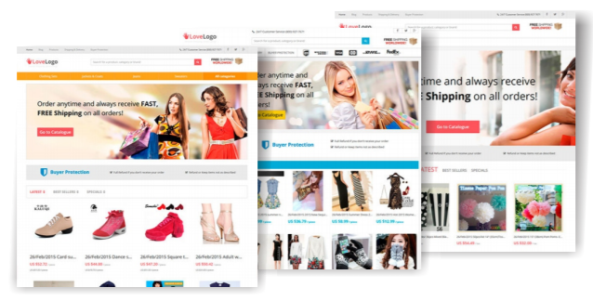
AliPlugin is a WordPress plugin that helps you transform your WordPress site into an affiliate online store for AliExpress. The plugin allows you to add over thousands of different products from AliExpress to your own WordPress site.
The plugin works by putting your unique affiliate id on all links back to AliExpress. With this, you will be able to earn a commission on all sales referred to AliExpress.
The plugin makes affiliate marketing with AliExpress super easy. It focuses on the affiliate aspect with AliExpress while it leaves you with marketing and driving of traffic to your online store.

What is the Range of Income you make with the help of AliPlugin?

Since most of the job is done by the plugin your only responsibility is to drive targeted traffic to your business. The more the traffic the more your commission.
However, AliExpress made its affiliate marketing lucrative because of its fierce competition with top stores like Amazon. As an affiliate with AliExpress you can earn up to 50% commission on some products but usually rare.
The easiest and popular commission ranges are usually within 4 to 8% commission on each product.
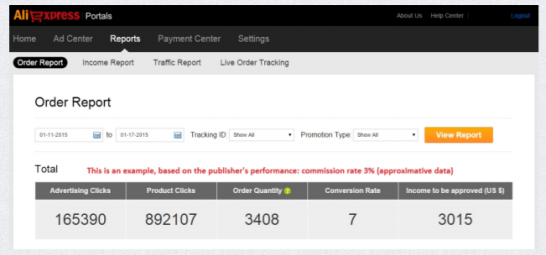
To get a potential earning for your website, normally the conversion ratio on AliExpress is usually 3.5% of all traffic. That is to say, 3.5% of visitors to AliExpress will end up buying a product.
Now, the average order size is $140, with this, if you can generate a traffic of 100 people to the website you might as well end up earning $41 on your traffic. Not bad is it?
A target of 500 unique visitors per day will go a long way, but you can definitely do better.

AliPlugin Features and Integration with AliExpress

The features of AliPlugin are one reason the plugin standout while making your affiliate journey with AliExpress an easy one.
Below are some of the features of AliPlugin:

Easily Transform Your WordPress Site to an Online Store

The plugin helps you transform your website into a professional looking e-commerce store. This is especially good for those that have little experience with creating a website of their own.
aliplugin review
AliPlugin offers several designed e-commerce themes that can change the look of your website within few minutes. These themes allow your website to look exactly like AliExpress and giving you more chance to make more money.
Like I said early all the hard work is done by the plugin you just need to generate traffic to your website.

Seamlessly Import Product Directly From AliExpress

One of your job as AliExpress affiliate is to promote their product. And in other to be successful at this, you need as many products as possible listed on your website.
But imagine adding all this product manually one by one. This is probably going to take forever.
This is where the AliPlugin comes in, it allows you to easily search for products on AliExpress either niche or generic products using your desired keyword.
Once you found these products, the plugin helps you import them to your own website with just a single click. The best part is you can add as many products as possible.
The Skye is your limit while using AliPlugin.

Auto Translation & Updates

While using AliPlugin, you don’t need to worry about some products you want to promote on AliExpress that’s written in Chinese language.
The plugin uses a special module you can connect that will allow you to translate product title and descriptions into more than 40 different languages with one click.
With this, you can easily sell to any country using your desired language translation.
The auto-update functionality allows you keep abreast of what’s going on AliExpress right on your own website. Whenever there is a new product, change of price or probably some products are out of stock the plugin will notify you appropriately.

Live Stats of Your Traffic

With this feature, you can easily monitor the progress of your business. From here you can see how many orders are completed, views on your websites and how many redirections to AliExpress each product is having.
aliplugin review
With the live stats, you can have a real-time statistics of how your website is performing with AliExpress in terms of commission.

Pros & Cons

AliPlugin just like every other service has its own good and less favored sides. Let’s take a look at them.

Pros

  • High Commission: the plugin gives you a better chance of earning high commission with AliExpress.
  • Built-in Store: with the help of AliPlugin you can easily build your own e-commerce website under a few minutes, even if you lack a prior experience.
  • Responsive Design: the theme that comes with AliPlugin are highly responsive for both desktop and mobile device which is good for an online shopping experience.
  • SEO Optimized: with the help of the plugin you can easily rank for a product search on search engines. These, however, gives you the chance of having more traffic.

Cons

  • Poor Support: No support from AliExpress and the support form AliPartnership is less than average.

How to Install and Setup AliPlugin by AliPartnership

Installing the Plugin only take about few minutes to install and set up. In fact, you don’t need to be techy or know HTML or be a WordPress expert to install the plugin.
After you’ve successfully installed your WordPress go to the Plugin section and click on “Add New button”.
From there, “click upload plugin” and find the AliPlugin archive on your computer.
Next, click “install now”
After the plugin has been successfully installed and activated you will see it on the left side of your WordPress dashboard.
Click on the plugin to configure it. Go to the configuration where you need to enter your App Key and tracking ID gotten from the official AliExpress portal.
Choose your theme and start enjoying your affiliate online store.

AliPlugin Review Conclusion

If you want an additional source of income that could make you more money on autopilot then I’ll suggest you give the plugin a try.
However, you’ve got to be patient for you to start seeing results. The best part I like about the plugin is it SEO enhancement. This feature allows you to rank for some certain keyword on search engine result.
If you can generate as low as 100 traffic a day from search engine result, you might as well be earning $41 every day. Which is not bad for a $47 investment.
My advice to most of my readers is that they should be patient. There’s nothing like a business is not working. People just don’t have enough patience to actually wait and see results. They want the fastest way to make money.
Over to you now, Can you make money with this plugin? Yes!
Having an experience or question you will like to share, please don’t hesitate to use the comment box.

Search This Blog

Vidiq Review (short)

YouTube creators or video creators know the value of subscriber traffic and YouTube channels. Many research have been conducted on YouTube c...